
Wednesday, October 26, 2011
CCNA 35 days till the exam
I'm 3 weeks out for sitting for the CCNA. It's been scheduled and I'm in insane review mode. I took a Boson test exam a few days back and scored a 72% on it. Which I'm thinking would have been a bit better but the sims were not loading giving me the "command set failed to load" error. Thus, I had points taken off and not gained. Still I have a few weeks left of review, so I'm thinking I should be scoring in the 90-100 range before the exam. At any rate, here's what my schedule looks like for the review time. I'm putting in on average 5 hours a day from multiple sources. It's grueling, but well worth it.

Thursday, October 13, 2011
FCC's broadband access map and proposed broadband build-out
The Federal Communications Commission (FCC) released the nation's broadband access map yesterday. It's an interesting look at what areas are connected via broadband. It is in line with population density. As you can see, broadband is most prevalent on the East Coast and rolling into the Mid-West (which incidentally is still very, very east if your on the West Coast). This report goes along with a proposal to increase broadband access through the Connect America Fund.
An older (cir. 2000) population map of the US via visualizingeconomics.com originally created by Joe Lertola for Time Magazine.

Thursday, October 6, 2011
Updated: CCNA 640-802 Official Cert Library, 3rd Edition by Wendel Odom
I was perusing over at the Cisco Press site and came across this new release of Odom's CCNA standard manual with a publish date for tomorrow, 10/07/2011.The books are available October 14th per the site.
I wonder what this means as far as CCNA 640-802 content. Spooky considering I'll be sitting for that exam soon.
 | |
| CCNA 640-802 Official Cert Library, Updated, 3rd Edition image from ciscopress.com |
I wonder what this means as far as CCNA 640-802 content. Spooky considering I'll be sitting for that exam soon.
Friday, September 30, 2011
Mind Map - Update
Just a quick update regarding the mind mapping online software I posted about a few days back. I started thinking more about how I wanted to lay out information in order to better grasp it and the thought of examples came to mind. Why not screen shots?
Cacoo.com, although slightly more difficult to input information into it has the great ability to import images from the web, your local machine, or can even take a screen shot. This feature makes me almost completely forget the less intuitive method of input. The input method is essentially, click & drag a shape, select the color properties, color the shape, type text, click the link icon, etc. Unfortunately, bubble.us, which has a very intuitive input method, has no feature for image input. Looks, like I'll be using Cacoo more.

Cacoo.com, although slightly more difficult to input information into it has the great ability to import images from the web, your local machine, or can even take a screen shot. This feature makes me almost completely forget the less intuitive method of input. The input method is essentially, click & drag a shape, select the color properties, color the shape, type text, click the link icon, etc. Unfortunately, bubble.us, which has a very intuitive input method, has no feature for image input. Looks, like I'll be using Cacoo more.

Tuesday, September 27, 2011
Mind Mapping
I've been looking at memory aids recently. I find I'm at the point where I grasp all the concepts and can lab the CCNA stuff till I'm blue in the face, but still need to memorize all the exam details. This is things like the range of area numbers and other things I've read a few times, but not completely committed to memory. Incidentally, that available area range is 0 to 4.2 billion.
So, I've been playing with the loci method (memory palace), mind maps, and have long been a fan of association techniques. below is an example of an online mind map and how I think Ill use it with my studies. It's called bubble.us. An interesting site that gives 3 free worksheets and then paid membership for more. I like the interface and keyboard mapped interactions. The caveat is that its flash 10 and therefore not Ipad compatible. With flash cards along and a mind map like this I'm hoping to better memorize the details of the exam.
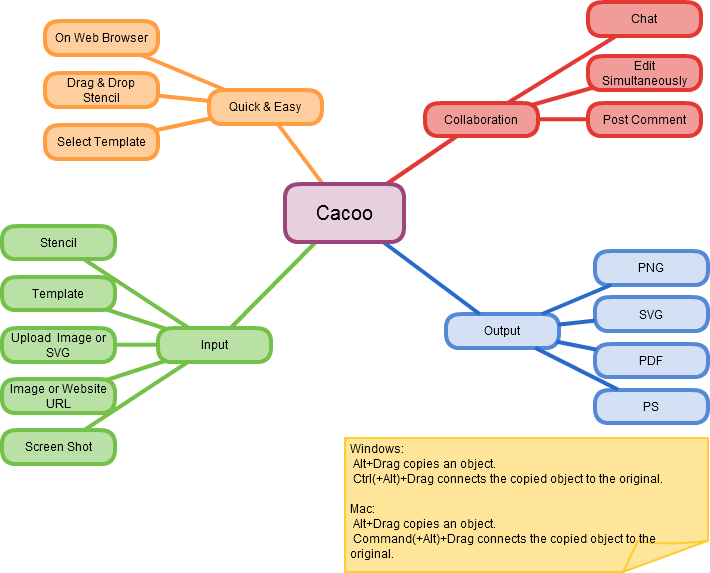
Cacoo (link) is another service but slightly more elaborate, allow for the creation of many more types of diagrams and charts. Below is an example of their mind map. The issue I see with Cacoo is that it takes a lot more effort and time to create a diagram and this doesn't serve taking notes.
www.mind-mapping.org has some great sites and software recommendations, where these both came from. If you think mind mapping the protocols, commands, and anything else might help. Give them a shot to see if there is some software that can help you in your exam sucess.

So, I've been playing with the loci method (memory palace), mind maps, and have long been a fan of association techniques. below is an example of an online mind map and how I think Ill use it with my studies. It's called bubble.us. An interesting site that gives 3 free worksheets and then paid membership for more. I like the interface and keyboard mapped interactions. The caveat is that its flash 10 and therefore not Ipad compatible. With flash cards along and a mind map like this I'm hoping to better memorize the details of the exam.
Cacoo (link) is another service but slightly more elaborate, allow for the creation of many more types of diagrams and charts. Below is an example of their mind map. The issue I see with Cacoo is that it takes a lot more effort and time to create a diagram and this doesn't serve taking notes.
www.mind-mapping.org has some great sites and software recommendations, where these both came from. If you think mind mapping the protocols, commands, and anything else might help. Give them a shot to see if there is some software that can help you in your exam sucess.

Saturday, August 27, 2011
Extended Access Control Lists (ACLs) breakdown
I’m working on ACLs, so I thought I would write something about them. I’ve come across a lot of good information like Cisco is easy's ACL posts, but I wanted to suppliment and visualize the options available when writing or determining what ACLs are doing. So, this tid bit covers Extended ACLs and the options available to them.
I wrote up two examples that I hope explore what Extended ACLs can do. It’s important to bare in mind that there are 3 ways to write the address portions of an ACL.
The first is with the “host” option:
access-list 110 permit tcp host 10.0.200.1 any eq 80
The second is via wild card mask:
access-list 110 permit tcp 172.16.26.2 0.0.31.255 any eq 80
The third is the “any” option which can also be written as “0.0.0.0 255.255.255.255” .
access-list 110 permit tcp any any eq 80
or
access-list 110 permit tcp 0.0.0.0 255.255.255.255 any eq 80
The last trick to keep in mind is when applying ACL filtering to all traffic from a subnet or IP range, the source traffic type should be “IP” -
access-list 192 deny IP any 10.1.1.0 0.255.255.255
This ACL denies everything to the 10.1.1.0/8 network. This essentially blocks all IP traffic.
--
Let’s look at two examples:
The first example denies the workstation with address 192.168.10.1 access to web services on any server in the 10.1.0.0 /16 subnet. In this case, traffic destined for http (port 80) will get filtered no matter what source port it originates from.
access-list 110 deny tcp host 192.168.10.1 10.1.1.0 0.0.255.255 eq 80
The second example is to permit tftp traffic from any host in the 192.160.0.0 /20 network to any server in the 10.1.1.0/24 network. With this ACL I am not only filtering traffic going to port 69, but I’m only allowing that traffic to originate from port 69. Granted this is something you’ll never see, it proves the point of filtering source ports as well as destination.
access-list 198 permit udp 192.168.20.0 0.0.15.255 eq tftp 10.1.1.0 0.0.0.255 eq 69
Let's break the ACL down a bit.


Thursday, August 25, 2011
Flash Cards (follow up)
So, it's been about a month now that I've been integrating flash cards into my CCNA studies in a big way. I wanted to give a bit of an update about my thoughts and usage of the the 2 tools I wrote about previously, Quizlet.com and Mental Case for Iphone/Ipad. I'll start with Quizlet then a brief note on Mental Case.
I have found this to be my main go to app for recording notes. Mental Case has the functionality, but Quizlet is just to accessible to use anything else. Bare in mind Mental Case is much fancier than Quizlet's simple tems and definition approach. Of course, you can add audio and video to Quizlet flash cards, but its a much more cumbersome process than just terms and definitions. Usually, I can read through a chapter or watch a video and then once I'm labbing, take notes and write up the cards. Here is an example set I made on general switch commands:
I think their main target audience is more the language student as the format isn't completely natural for technical writing or shell type commands. With that said, the embedded text to speech engine (a small speaker icon appears next to ever term and definition) does a pretty good job of speaking the tech definitions I've accumulated.
There is also an interesting game (the most applicable of 3) I play from time to time, when I find I need a swtich from standard flash cards and still want to progress with learning the subject matter. It's called Scatter:
This game works much better with larger dimentions
All in all I think Quizlet is an extremely worthwhile service if your looking to create your own flash cards (or search from their database). So far I've created some 600 flash cards and am about 2/3rds through my studies.
As for Mental Case, I enjoy the app and its polished look, but find it sometimes difficult to navigate. Utilizing it solely as a front/back flash card app works fine, but the app;s study feature benifits have so far eluded me. I suppose I would like a little less polish and a little more customization / functionality in the app, both on the Ipad and Iphone. With that said, I still think its the top flash card study app at this point.
I have found this to be my main go to app for recording notes. Mental Case has the functionality, but Quizlet is just to accessible to use anything else. Bare in mind Mental Case is much fancier than Quizlet's simple tems and definition approach. Of course, you can add audio and video to Quizlet flash cards, but its a much more cumbersome process than just terms and definitions. Usually, I can read through a chapter or watch a video and then once I'm labbing, take notes and write up the cards. Here is an example set I made on general switch commands:


I think their main target audience is more the language student as the format isn't completely natural for technical writing or shell type commands. With that said, the embedded text to speech engine (a small speaker icon appears next to ever term and definition) does a pretty good job of speaking the tech definitions I've accumulated.
There is also an interesting game (the most applicable of 3) I play from time to time, when I find I need a swtich from standard flash cards and still want to progress with learning the subject matter. It's called Scatter:
This game works much better with larger dimentions
All in all I think Quizlet is an extremely worthwhile service if your looking to create your own flash cards (or search from their database). So far I've created some 600 flash cards and am about 2/3rds through my studies.
As for Mental Case, I enjoy the app and its polished look, but find it sometimes difficult to navigate. Utilizing it solely as a front/back flash card app works fine, but the app;s study feature benifits have so far eluded me. I suppose I would like a little less polish and a little more customization / functionality in the app, both on the Ipad and Iphone. With that said, I still think its the top flash card study app at this point.
Subscribe to:
Posts (Atom)