Showing posts with label Administration. Show all posts

Thursday, March 22, 2012

Quick Configurations Make For Trouble

I'm a few days behind in my studies for the RHCSA. I've scheduled the exam which has the added effect of pressure to be done within a certain time frame even though, I can of course, reschedule. Who wants to do that though!

For labbing I enabled X11 over SSH and am running GUI tools like virt-manager and system-config-firewall (iptables shell commands changed with RHEL 6 and I'm working on gotten it all sorted out) while not at home. Even at home though, I connect via VNC from my Mac Pro to the VM server.


The VM server built with Scientific Linux 6 and Tigervnc (quasi Xvnc)  is their default VNC server from their SL repo. So, it is what I went with to get things up quickly.

[root@shuttlehosti ~]# yum search vnc server
...
tigervnc-server.x86_64 : A TigerVNC server
...
[root@shuttlehosti ~]# yum install tigervnc-server.x86_64
Done.

Ok, I installed, configured it under my user account, according to this post from server-world.info. Then checked to see if it was persistent through reboots and it wasn't. That's fine. I only wanted my user account to be able to have access, I wrote a super simple bash script and dropped it in my .bashrc file.

[root@shuttlehosti ~]# less /home/kim/vnc-start.sh

#!/bin/bash

vncserver :1 -geometry 1280x1024 -depth 24
/home/kim/vnc-start.sh (END)

...
[root@shuttlehosti ~]# less /home/kim/.bashrc

# .bashrc

# Source global definitions
if [ -f /etc/bashrc ]; then
        . /etc/bashrc
fi

# User specific aliases and functions
/home/kim/vnc-start.sh
/home/kim/.bashrc (END)

Each time I log in to the machine it launches the vnc service for display :1 and fails out if display :1 is already open. Great until I have more time to focus on shell scripting. 

Yesterday, I started having issues with the VNC server and my connection attempts were getting refused. I would log out or reboot and try the connection and get be refused. Ok, disable IPtables, SELinux and try it again. Still nothing. Even running "vncserver -kill :1" didn't stop the process or allow me to log in.

So, whats the vnc process up to?  I do a

[root@shuttlehosti ~]#ps -efH | grep vnc
qemu      7458     1  0 Mar08 ?        00:01:28   /usr/libexec/qemu-kvm ...

 There are three processes just like that. Hmm 3 VMs up and running. Which means each VM  takes up a single vnc display when up and running. Curious. I checked out the VNC command options and came up with:

[kim@shuttlehosti ~]$ vncserver -list

TigerVNC server sessions:

X DISPLAY #     PROCESS ID
:2              5931
:1              4007
:3              4206
[kim@shuttlehosti ~]$

The processes correspond to the VM processes noted in the ps command. Jeez. Ok, I shutdown the VMs, kill off the vnc process if any are left, relaunch the vnc process under my user account, and it works like a charm.

The moral of the story? Don't rush through Linux technologies when you need to " to get things up quickly."

So, RHCSA studies can resume. After the exam I would like to figure out how to write a shell script to check for the next available vnc display and to open a IPtables port to allow for connection.

Tuesday, January 3, 2012

Softether, the Pest.

Today's fun was dealing with a VPN client from Japan called Softether PacketiX VPN. It's a free VPN package out of Japan that's won some awards and had someting like 3 million downloads in its first week of availability.

The client works fine and the VPN is fine, however while its not connected or in use I get alert emails from one of the firewalls telling me the internal IP of the VPN client is making http requests to some unknown server.  Then I get a barrage of some 70 alert Emails from the firewall about the address 130.158.6.56 doing port scans on an internal firewall... What the?

So, I jumped onto Splunk to see what the different logs were saying. I do a search for 130.158.6.56 and find that my internal VPN client, which isn't connected to any session, is keeping a heartbeat with this IP.
Jan  3 15:09:00 (edge FW IP) id=firewall sn=xxxxxxxxxxx time="2012-01-03 15:08:34" fw=(Public IP) pri=6 c=1024 m=537 msg="Connection Opened" n=0 usr="admin" src=(internal FW IP):59474:X0 dst=130.158.6.56:80:X1 proto=tcp/http sent=144   
  • host=xxx.xxx.xxx.xxx   Options|  
  • sourcetype=syslog   Options|  
  • source=Edge Router   Options|  
  • dst=130.158.6.56:80:X1   Options
Okay, I did some Googling to see what the IP was. Then I ran netstat on the client. You might have assumed it's the developers site and your right, keepalive.softether.com. This is an odd one. So, it's a keepalive for the VPN? Shouldn't that be handled by the VPN server?

At any rate, PacketiX is big in Japan and other East Asian countries, but interest is minimal in N. America. Thus, English documentation is close to nil. I added a firewall rule to drop all packets from the 130.158.6.56 IP and went back to digging through the PacketiX client.

IP info from robotex.com

First things first, kill the idle VPN application and disable the virtual Nic. Then run netstat after a few moments. Odd, it's stilll there. So, I ran netstat again with the -bn options to see the process that started the connection. It's listed the antivirus as the executable process. Okay.

Next step is to kill the tcp connection. I opened up CurrPorts to kill off the TCP connection. No dice, Chicago. Doh, I closed all incoming connections from 130.158.6.56. I effectivly killed off 1/2 of the TCP handshake making it so SYN packets would never get a responce from the server named keepalive.


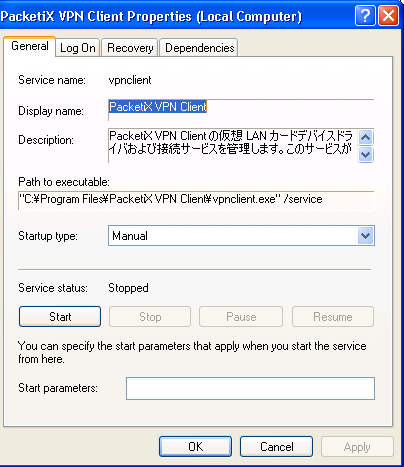
Ok, pull up Process Explorer and have a look - see for Softether or PacketiX. Sure enough, there was an active service in addition to the client software and the virtual Nic.


Ok, stop the service and make sure it's going to only be started manually from now on.


Check netstat again and the TCP connection is gone. Nice. Back over to the firewall and allow connections from 130.158.6.56 again. I watched the logs for a bit longer, but no further traffic came through with the volume of garbage that PacketiX was.

In my search, I did manage to find this document by one James T. Yu, Ph.D. covering the basics of Softether and stating it is known to have "traffic difficult to detect and filter by the firewall [4]. As a result, SoftEther is considered a pest by many pest control tools." I'll agree. A good tool, but certianly a pest.