With the RHCSA finished up I am digging in no Python before moving on to the RHCE. Plus, I have a few months before my VMWare ICM (v.5) class, which begins at the end of August.
The first class I'm taking is Zed Shaw's Learn Python The Hard Way. It is essentially a book containing some 50+ exercises for learning Python. I came across the course on Udemy back around the end of 2011 and haven't had a chance to start the class until now. The Udemy course has Q&As with Shaw and videos detailing the exercises in the book. The course starts out very basic using Python 2.x and covering such things as printing text and doing mathematics. Also, the course is setup to be a "learn by doing" course with many items not explained. You are, however, instructed to look these items up and Mr. Shaw seems ready to anser questions at a moments notice. I've given myself about a month to blow through the course and do all the exercises a few times.
SecurityTube Python Scripting Expert from Vivek Ramachandran on Vimeo.
In July I will begin the Securitytube Python Scripting Expert (Spse) Course And Certification which seems to jump into more in depth Python topics with an infosec focus. That should take me through the end of July when I'm tentatively planning to take the SPSE exam.
After that August will have arrived. I'll begin studying for the RHCE exam then and come late August my VMware ICM class will begin. The ICM course is one night, weekly, but I have 2 other courses as well. So, hopefully I will have some additional time to study for the RHCE durring the initial few months of classes.
Showing posts with label Study tools. Show all posts
Monday, June 18, 2012
Thursday, June 14, 2012
Notes from the Net 2012 06 14
Finished up the RHCSA. On to the SecurityTube Python Scripting Expert course.
This months notes:
Routing:
The IP Routing Process - Step-by-Step Analysis
http://www.firewall.cx/networking-topics/routing/181-routing-process.html?goback=.gde_123120_member_110099489
Tools:
Smoke ping
http://oss.oetiker.ch/smokeping/doc/smokeping_install.en.html
Cloud Performance Analysis (Large Scale)
http://dsl-wiki.cs.uchicago.edu/index.php/Cloud_Performance_Analysis_%28Large_Scale%29
RT: Request Tracker
http://bestpractical.com/rt/
Keypass Password Safe
http://keepass.info/index.html
Top 5 (mostly free) tools for monitoring bandwidth
http://community.spiceworks.com/topic/222989-top-5-mostly-free-tools-for-monitoring-bandwidth
Productivity:
Some really great tools for time management (inc. a typing app, location tracking, email organization, etc.) :
http://www.inc.com/ilya-pozin/time-management-tips-how-to-save-an-hour-every-day.html
Linux:
Tuning your system with Tuned
http://servicesblog.redhat.com/2012/04/16/tuning-your-system-with-tuned/
Intro to Linux Shared Libraries
http://www.thegeekstuff.com/2012/06/linux-shared-libraries/?utm_source=feedburner&utm_medium=email&utm_campaign=Feed%3A+TheGeekStuff+%28The+Geek+Stuff%29
Linux tgtadm: Setup iSCSI Target ( SAN )
http://www.cyberciti.biz/tips/howto-setup-linux-iscsi-target-sanwith-tgt.html
SELinux tutorial
http://hackinglinux.blogspot.com/2007/05/selinux-tutorial.html
15 Examples To Master Linux Command Line History
http://www.thegeekstuff.com/2008/08/15-examples-to-master-linux-command-line-history/
Windows:
Reading HFS+ drives on Windows (this is the Windows driver):
http://www.insanelymac.com/forum/index.php?s=95be5f9ff95000712b712472950e730e&showtopic=183351&view=findpost&p=1769690
New Windows 8 Task Manager
http://blogs.msdn.com/b/b8/archive/2011/10/13/the-windows-8-task-manager.aspx
Active Directory 70-640 Free Video Course
http://www.youtube.com/playlist?list=PLBBA04BF566F0E0D6
Clustering:
dealing with HPC (Beowolf) clusters
http://queue.acm.org/detail.cfm?id=1242501
Storage:
ISCSI vs. Fibre Channel SANs
http://www.cuttedge.com/files/iscsi_vs_fiberchannel_explain.pdf
Dell SAN training
www.amazon.com/Dark-Side-Moon-Experience-Remaster/dp/B005NNUKF4/ref=tmm_msc_title_0
SNIA SAN foundation training
http://www.angelbc.com/snia/snia_buy2_EW.html
Quantum StorageCare Learning
http://www.quantum.com/ServiceandSupport/StorageCareLearning/Catalog/Index.aspx
EMC Information Storage and Management v2 (ISM v2) FAQs
https://community.emc.com/docs/DOC-16510
Education, Career, & Certification:
Realtime Nexus Digital Library (a free resource for IT Pros)
http://nexus.realtimepublishers.com/
How to land a cybersecurity job
http://www.networkworld.com/news/2012/050312-cybersecurity-tips-258931.html
This months notes:
Routing:
The IP Routing Process - Step-by-Step Analysis
http://www.firewall.cx/networking-topics/routing/181-routing-process.html?goback=.gde_123120_member_110099489
Tools:
Smoke ping
http://oss.oetiker.ch/smokeping/doc/smokeping_install.en.html
Cloud Performance Analysis (Large Scale)
http://dsl-wiki.cs.uchicago.edu/index.php/Cloud_Performance_Analysis_%28Large_Scale%29
RT: Request Tracker
http://bestpractical.com/rt/
Keypass Password Safe
http://keepass.info/index.html
Top 5 (mostly free) tools for monitoring bandwidth
http://community.spiceworks.com/topic/222989-top-5-mostly-free-tools-for-monitoring-bandwidth
Productivity:
Some really great tools for time management (inc. a typing app, location tracking, email organization, etc.) :
http://www.inc.com/ilya-pozin/time-management-tips-how-to-save-an-hour-every-day.html
Linux:
Tuning your system with Tuned
http://servicesblog.redhat.com/2012/04/16/tuning-your-system-with-tuned/
Intro to Linux Shared Libraries
http://www.thegeekstuff.com/2012/06/linux-shared-libraries/?utm_source=feedburner&utm_medium=email&utm_campaign=Feed%3A+TheGeekStuff+%28The+Geek+Stuff%29
Linux tgtadm: Setup iSCSI Target ( SAN )
http://www.cyberciti.biz/tips/howto-setup-linux-iscsi-target-sanwith-tgt.html
SELinux tutorial
http://hackinglinux.blogspot.com/2007/05/selinux-tutorial.html
15 Examples To Master Linux Command Line History
http://www.thegeekstuff.com/2008/08/15-examples-to-master-linux-command-line-history/
Windows:
Reading HFS+ drives on Windows (this is the Windows driver):
http://www.insanelymac.com/forum/index.php?s=95be5f9ff95000712b712472950e730e&showtopic=183351&view=findpost&p=1769690
New Windows 8 Task Manager
http://blogs.msdn.com/b/b8/archive/2011/10/13/the-windows-8-task-manager.aspx
Active Directory 70-640 Free Video Course
http://www.youtube.com/playlist?list=PLBBA04BF566F0E0D6
Clustering:
dealing with HPC (Beowolf) clusters
http://queue.acm.org/detail.cfm?id=1242501
Storage:
ISCSI vs. Fibre Channel SANs
http://www.cuttedge.com/files/iscsi_vs_fiberchannel_explain.pdf
Dell SAN training
www.amazon.com/Dark-Side-Moon-Experience-Remaster/dp/B005NNUKF4/ref=tmm_msc_title_0
SNIA SAN foundation training
http://www.angelbc.com/snia/snia_buy2_EW.html
Quantum StorageCare Learning
http://www.quantum.com/ServiceandSupport/StorageCareLearning/Catalog/Index.aspx
EMC Information Storage and Management v2 (ISM v2) FAQs
https://community.emc.com/docs/DOC-16510
Education, Career, & Certification:
Realtime Nexus Digital Library (a free resource for IT Pros)
http://nexus.realtimepublishers.com/
How to land a cybersecurity job
http://www.networkworld.com/news/2012/050312-cybersecurity-tips-258931.html
Friday, March 16, 2012
Primer on reading Michael Jang's Red Hat Linux Certification Study Guide
I started reading Michael Jang's RHCSA/RHCE Red Hat Linux Certification Study Guide about 2 weeks ago, then took a brief detour (3 days) to get my VM server up and running (see post - RHCSA Labs and Shuttle trouble - Just Getting Started). I'm working my way through the book and although it gets great reviews and is it's a great reference, I can't help but feel it's a tad all over the place.
For instance, The first couple of chapters have labs working through the chapter that are referenced at later points in the book (with things like "if you followed the previous lab, you should be here..."). However, it's never really clear if you're supposed to work those labs or only the ones at the end of the chapter, which seem a bit more official. I've been working both. On one hand the repetitive action is great, on the other it's starting to get a bit confusing.
Then there's the references to random sections in regards to previous and more advanced topics, which can drive one mad if you let it. Take SELinux for instance. When you are initially focusing on setting up VMs and deploying via kickstart, why not just set SELinux to permissive to allow a more clear focus on Kickstart? Instead there are random commands with no explanation other than referring to Chapter 4 and 11. Granted I know not all can be be explained at once, so why not circumvent the more advanced technology for the time being and address it with more a in depth explanation later in the book?
Well, enough ranting and besides, I really do like the book so far, sans the lab murkiness. Where this leads me is to a desire to list coherent directions on how to approach Jang's book. So, I'm going to layout how I am doing the initial 2 chapters and hope that will help keep me straight on what's going on.
Also, take note, some of the same tasks need to be done multiple times.
Chapter 1 Tasks:
Chapter 2 Tasks:
The rest of the chapters are a bit more straight forward and so I won't do a layout for them.
As another side note, Chapter 4's primer on SELinux can be well supplemented by the following:
Red Hat Enterprise Linux 6 Security-Enhanced Linux - User Guide
Linux Journal's Paranoid Penguin - Introduction to SELinux
Linux Journal's Paranoid Penguin - Introduction to SELinux, Part II
For instance, The first couple of chapters have labs working through the chapter that are referenced at later points in the book (with things like "if you followed the previous lab, you should be here..."). However, it's never really clear if you're supposed to work those labs or only the ones at the end of the chapter, which seem a bit more official. I've been working both. On one hand the repetitive action is great, on the other it's starting to get a bit confusing.
Then there's the references to random sections in regards to previous and more advanced topics, which can drive one mad if you let it. Take SELinux for instance. When you are initially focusing on setting up VMs and deploying via kickstart, why not just set SELinux to permissive to allow a more clear focus on Kickstart? Instead there are random commands with no explanation other than referring to Chapter 4 and 11. Granted I know not all can be be explained at once, so why not circumvent the more advanced technology for the time being and address it with more a in depth explanation later in the book?
Well, enough ranting and besides, I really do like the book so far, sans the lab murkiness. Where this leads me is to a desire to list coherent directions on how to approach Jang's book. So, I'm going to layout how I am doing the initial 2 chapters and hope that will help keep me straight on what's going on.
Also, take note, some of the same tasks need to be done multiple times.
Chapter 1 Tasks:
- Read through chapter 1 without attempting exercises or labs
- Note drive partition suggestions (somewhat important for VM labs).
- Note basic installation steps
- Download demo of RHEL, download Scientific Linux 6 / CentOS 6
- I grabbed a 30 day evaluation of RHEL (requires registration) and the flavors
- Do Exercise 1.1 - Partitioning during install of RHEL (or flavor) on VM server
- if you setup the VM host as part of exercise 1, ignore the partitions he noted as you will need more space for VMs
- I'm working remotely, so setup VNC for host machine. Here's good instructions.
- Follow along with noted basic installation steps
- If using a server to host VMs, ensure it is KVM capable Intel vmx or AMD svm
- #egrep "vmx|svm" /proc/cpuinfo | less
- in less type "/vmx" to search for vmx in the results
- Setup and configure default file sharing services (http & ftp) on VM host
- Do Exercise 1.2 - configure Apache and vsFTP on VM host
- Do Lab 1
- Do Lab 2 - copy install media contents to the share directory on VM host
- Do Lab 3
Chapter 2 Tasks:
- Ensure KVM is installed (pdf p.4-6)
- Ensure the KVM modules are installed correctly
- #lsmod | grep kvm
- run "virt-manager" with root privileges from a shell within the GUI
- The hypervisor (virt-manager) is supposed to prompt for the root password if run from a normal user, but I was unable to run it at all that way. Thus, VMM was not an option from the user's desktop menu
- Do Exercise 2-1 within the hypervisor
- Configure and create a VM (pdf p.15-19)
- Do Exercise 2-2 with the VM you just created (why wasn't that an exercise?)
- Note the VM deletion method on p.24
- Configure VM server to be a kickstart server (pdf p.29-31)
- Do Exercise 2-3
- Install kickstart configurator and create kickstart file with it.
- *Name it something different than the ks config from Exercise 2-3
- Configure X over SSH on VM server or one of the VMs
- Work through the 8 Labs.
The rest of the chapters are a bit more straight forward and so I won't do a layout for them.
As another side note, Chapter 4's primer on SELinux can be well supplemented by the following:
Red Hat Enterprise Linux 6 Security-Enhanced Linux - User Guide
Linux Journal's Paranoid Penguin - Introduction to SELinux
Linux Journal's Paranoid Penguin - Introduction to SELinux, Part II
Labels:
Articles,
Certification,
Linux,
RedHat,
Research,
RHCSA,
Study tools
Tuesday, September 27, 2011
Mind Mapping
I've been looking at memory aids recently. I find I'm at the point where I grasp all the concepts and can lab the CCNA stuff till I'm blue in the face, but still need to memorize all the exam details. This is things like the range of area numbers and other things I've read a few times, but not completely committed to memory. Incidentally, that available area range is 0 to 4.2 billion.
So, I've been playing with the loci method (memory palace), mind maps, and have long been a fan of association techniques. below is an example of an online mind map and how I think Ill use it with my studies. It's called bubble.us. An interesting site that gives 3 free worksheets and then paid membership for more. I like the interface and keyboard mapped interactions. The caveat is that its flash 10 and therefore not Ipad compatible. With flash cards along and a mind map like this I'm hoping to better memorize the details of the exam.
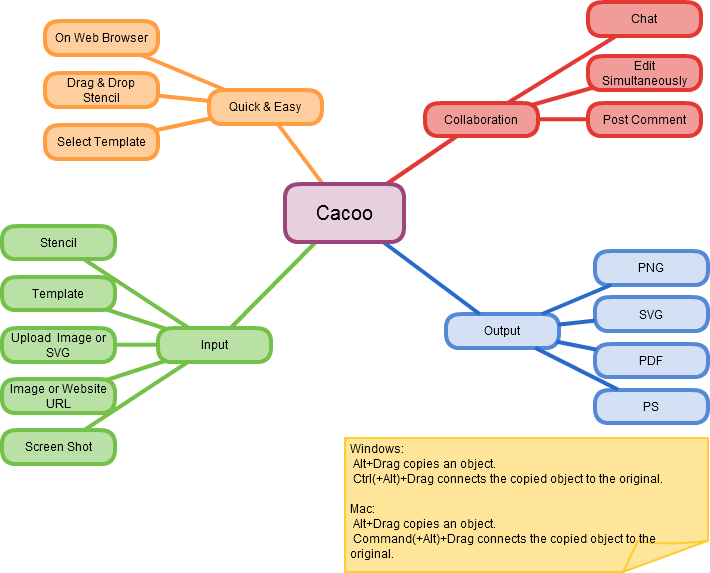
Cacoo (link) is another service but slightly more elaborate, allow for the creation of many more types of diagrams and charts. Below is an example of their mind map. The issue I see with Cacoo is that it takes a lot more effort and time to create a diagram and this doesn't serve taking notes.
www.mind-mapping.org has some great sites and software recommendations, where these both came from. If you think mind mapping the protocols, commands, and anything else might help. Give them a shot to see if there is some software that can help you in your exam sucess.
So, I've been playing with the loci method (memory palace), mind maps, and have long been a fan of association techniques. below is an example of an online mind map and how I think Ill use it with my studies. It's called bubble.us. An interesting site that gives 3 free worksheets and then paid membership for more. I like the interface and keyboard mapped interactions. The caveat is that its flash 10 and therefore not Ipad compatible. With flash cards along and a mind map like this I'm hoping to better memorize the details of the exam.
Cacoo (link) is another service but slightly more elaborate, allow for the creation of many more types of diagrams and charts. Below is an example of their mind map. The issue I see with Cacoo is that it takes a lot more effort and time to create a diagram and this doesn't serve taking notes.
www.mind-mapping.org has some great sites and software recommendations, where these both came from. If you think mind mapping the protocols, commands, and anything else might help. Give them a shot to see if there is some software that can help you in your exam sucess.
Subscribe to:
Posts (Atom)